Your first app
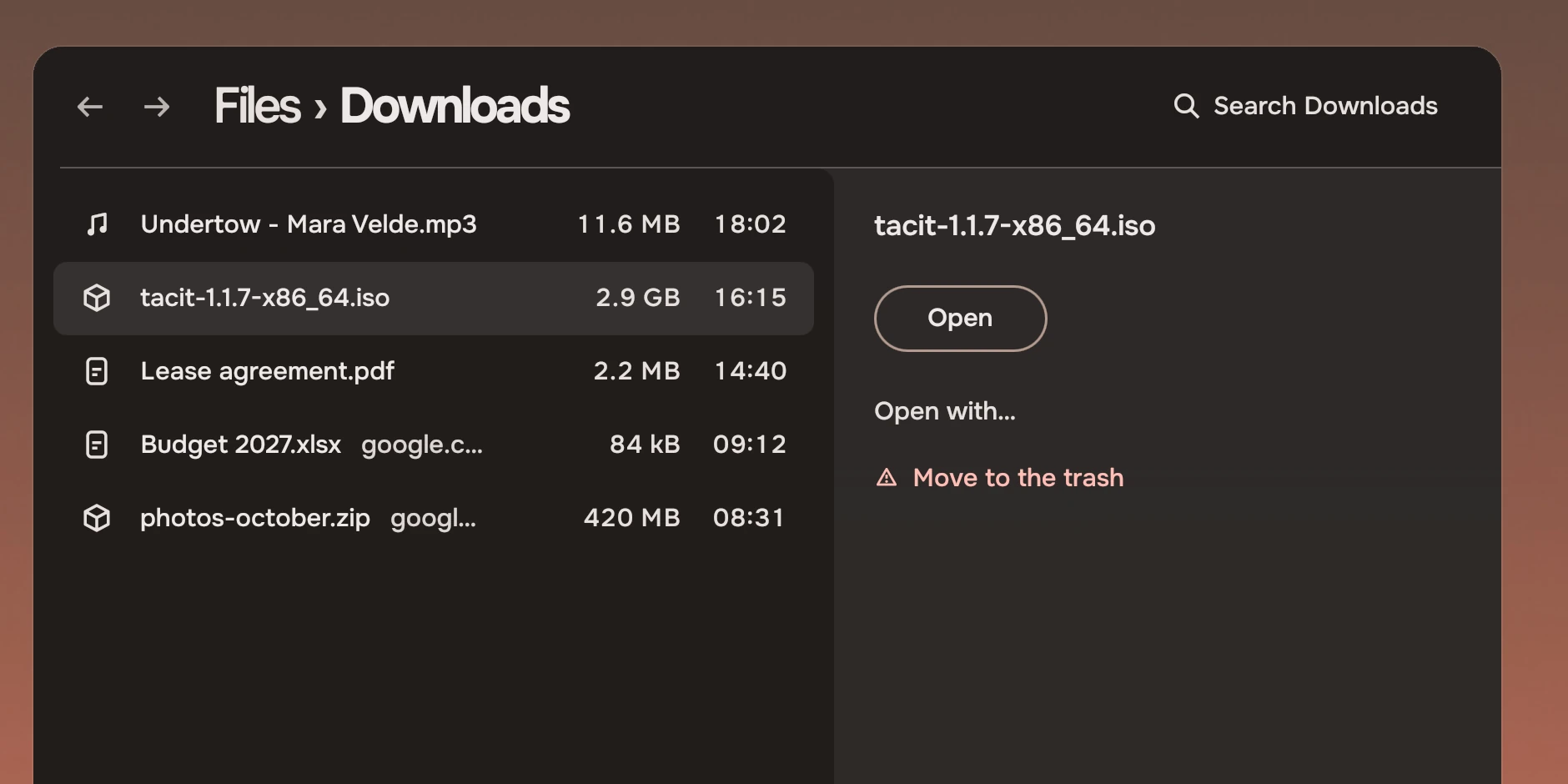
A small working app made only of kit parts: a list of downloads with a search, a header and a panel that opens on Space. All of it is below.
You need Quickshell 0.3 or later on Qt 6.7 or later, and the kit. On Tacit the kit is installed. Elsewhere, put the kit's qml/ folder on the import path when you run the app.
The whole app
Save this as downloads.qml. It is the file the picture above was made from.
import QtQuick
import Quickshell
import Tacit.Kit

FloatingWindow {
    id: window
    title: "Downloads"
    implicitWidth: 880
    implicitHeight: 480
    color: "transparent"

    readonly property var files: [
        {
            name: "Undertow - Mara Velde.mp3", kind: "music_note", from: "bandcamp.com",
            size: "11.6 MB", when: "18:02"
        },
        {
            name: "tacit-1.1.7-x86_64.iso", kind: "deployed_code", from: "download.tacitos.co",
            size: "2.9 GB", when: "16:15"
        },
        {
            name: "Lease agreement.pdf", kind: "picture_as_pdf", from: "docs.google.com",
            size: "2.2 MB", when: "14:40"
        },
        {
            name: "Budget 2027.xlsx", kind: "description", from: "google.com",
            size: "84 kB", when: "09:12"
        },
        {
            name: "photos-october.zip", kind: "deployed_code", from: "google.com",
            size: "420 MB", when: "08:31"
        }
    ]
    readonly property var shown: files.filter(
        f => f.name.toLowerCase().includes(search.text.toLowerCase()))

    // the window's ground, at the see-through the user has set; the compositor rounds the window itself
    WindowGround { radius: 0 }

    PageHeader {
        id: header
        width: parent.width
        crumbs: ["Files"]
        here: "Downloads"
        canGoBack: false
        SearchField {
            id: search
            anchors.verticalCenter: parent.verticalCenter
            scope: "Downloads"
            onDown: list.forceActiveFocus()
            onDismissed: list.forceActiveFocus()
        }
    }

    RowList {
        id: list
        anchors {
            top: header.bottom; topMargin: Kit.tokens.space.m
            left: parent.left; leftMargin: Kit.tokens.space.m
            right: panel.left; rightMargin: Kit.tokens.space.m
            bottom: parent.bottom
        }
        label: "Downloads"
        model: window.shown
        delegate: ListRow {
            required property var modelData
            required property int index
            width: list.rowWidth
            focusable: false
            glyph: modelData.kind
            name: modelData.name
            aside: modelData.from
            facts: [modelData.size, modelData.when]
            selected: list.isSelected(index)
            ring: list.ringAt(index)
            onClicked: m => list.clickAt(index, m)
            onActivated: list.activated(index)
        }
        // Space shows the selection in the panel and hides it again; Enter would open the file
        onPeeked: panel.open = !panel.open
        Component.onCompleted: forceActiveFocus()
    }

    DockedPanel {
        id: panel
        label: "Details"
        Keys.onEscapePressed: open = false      // from anywhere inside the panel
        anchors.right: parent.right
        y: header.height
        height: parent.height - header.height - Kit.tokens.space.xl
        Column {
            x: Kit.tokens.space.xl
            y: Kit.tokens.space.xl
            width: Kit.tokens.width.panel - 2 * Kit.tokens.space.xl
            TacitText {
                width: parent.width
                text: window.shown[list.cursor]?.name ?? ""
                size: "body"
                weight: "medium"
                wrapMode: Text.Wrap
            }
            Item { width: 1; height: Kit.tokens.space.xl }
            Slab { text: "Open"; tone: "default" }
            Item { width: 1; height: Kit.tokens.space.l }
            WordAction { text: "Open with…" }
            WordAction { text: "Move to the trash"; risk: true }
        }
    }
}
Run it
QML_IMPORT_PATH=/path/to/tacit-kit/qml qs -p downloads.qml
On Tacit, leave out QML_IMPORT_PATH. Press the down arrow to select a file, then Space to open its panel. Escape closes it. Type in the search to narrow the list.
What each part does
The import. import Tacit.Kit brings in the parts and the Kit singleton. Nothing else is needed for colour: Kit.tokens follows the user's wallpaper by itself, the way the desktop does, and falls back to one fixed palette where there is no Tacit. Run the same file on a Moss wallpaper and it turns green, with no change. The Moss render of the figure above is the same file.
The window and its ground. FloatingWindow with a transparent colour, and WindowGround, which draws the shell's ground at the see-through the user has set. The compositor blurs the wallpaper behind it. radius: 0 leaves the rounding to the compositor. Do not draw a grey slab here; see Materials.
The header. PageHeader shows the path as the title: crumbs are the parents, here is the page. Put the page's own tools inside it. SearchField names its scope, "Search Downloads", and gives the keyboard to the list when you press the down arrow.
The list. RowList is one stop for Tab and owns the keyboard: arrows, Home and End, Shift to extend, type to jump. The app gives the delegate, a ListRow, and binds it to the list with selected, ring and the two handlers. The list is the one tab stop, so each row says focusable: false. label is what a screen reader calls the list.
The panel. DockedPanel hangs from the header's line into the window's right edge. It is a Column of a name, one Slab (the way forward) and two actions as words, the risk last. The list narrows once when it opens because its right edge is the panel's left edge. Opened with a key, the panel takes the keyboard and gives it back to the list when it closes.
Space and Escape. A row list reports Space as peeked and Enter as activated, so the app writes one handler for each and needs no Shortcut. Here onPeeked toggles panel.open, and Space still types a space in the search field because the list only hears it while it has the keyboard. Enter would open the file, so onActivated is where that goes. Escape closes the panel from anywhere inside it, with a Keys.onEscapePressed on the panel: the panel binds no keys of its own.
See it on two wallpapers
tools/grab.sh, in the kit's source, runs an app with no desktop and saves what its window draws, once for each palette in tools/palettes/ (dusk and Moss): tools/grab.sh downloads.qml shots/ writes shots/dusk.png and shots/moss.png. The window's see-through parts stay transparent in the picture. Use it to check a change on both palettes before you look at it on your own wallpaper, or in a test run where there is no screen. GRAB_SETTLE=3000 waits longer for an app that loads slowly.
What to do next
Give the rows a real model, a folder read from disk. Put the same parts in a second page and let the header's back button return. Add a rail of places beside the header, a view bar under it, and a menu for the order. Then read Colour and States so that anything you draw yourself matches.
Experimental, in Tacit.Kit 0.1.
Text and figures: CC BY 4.0. Tacit.Kit: LGPL-3.0 code, OFL fonts. The Tacit name.