Accessibility
Contrast is solved, not hoped for. Every part has a key path and a name, and every target is large enough to hit.
Contrast
Every text ink is solved to an APCA contrast on the window ground: main 92, secondary 85, meta 75. The floor for small text is 75, so nothing smaller than meta is used for text. The risk ink and the inks a menu uses on its overlay (the headings and details, and the risk line) are solved to 75 as well, on the ground they sit on. Because the inks are solved along the wallpaper's hue, the same levels hold on dusk and on Moss and on any wallpaper the shell can make.
Three things are below 75 on purpose. Faint, at 60, is the ink of a disabled part (an icon button, a slider, a switch, a field): it is not read and does nothing. The quiet and past inks (38 and 18) are for context that is not read as text, such as lyrics still to come, and a quiet row, which is a cut file or a partial download. The hairline, at 16, is a line.
The accent is never text, and a state is never shown by the colour of words alone: selection is a wash, focus is a ring, a risk carries the warning symbol.
Keyboard
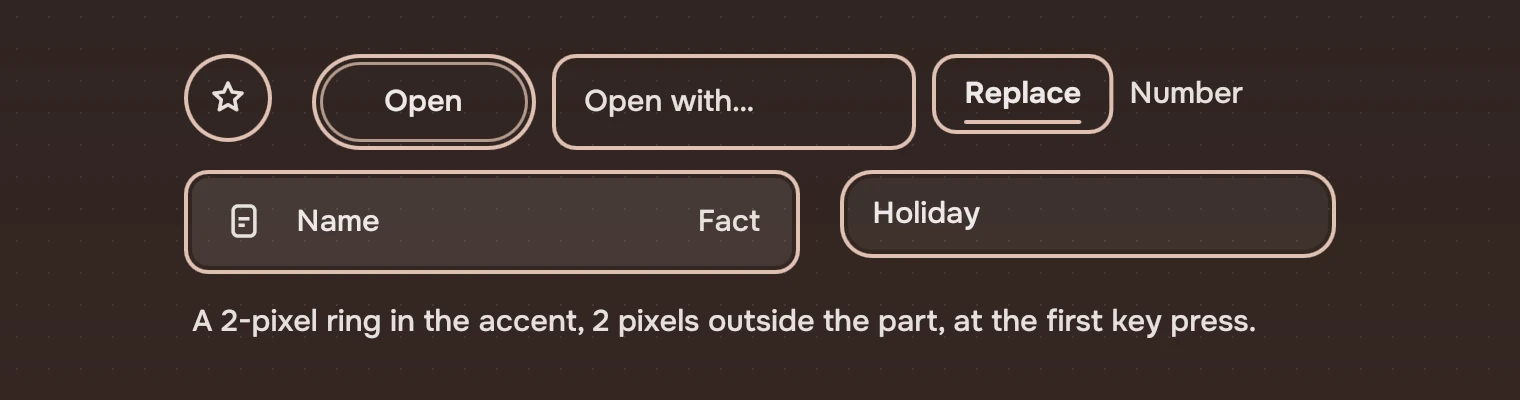
A part that takes the pointer takes a key. A list is one stop for Tab and the arrows move inside it; so does the rail. The jump index is the one part that is not a stop: typing a name in the list does what it does. The focus ring shows from the first key press, and States gives its size and when it goes.
Call Kit.watchKeys(window) once for each window. A kit part turns the ring on from its own key handler, so without the call the first Tab, which lands before any part has seen a key, shows no ring.
| Do this | To |
|---|---|
| Tab | Move to the next part; a list or the rail is one stop |
| ↑ ↓ | Move inside a list, the rail or a menu |
| Space | In a list, take a look without opening (the app's docked panel); on a button, press it |
| Enter | Open; on a button, press it |
| Esc | Close a menu; while a name is edited, go back to the old name; while an action asks, go back to its words; in a search, clear it, then leave it. Closing a docked panel is the app's |
| Menu | The row's menu |
Names
Every part says what it is to a screen reader. An icon button's label is required, since the symbol says nothing to one. A field is its text input itself, named by its label (or its hint if there is no label). A row is a list item named by its name and the name beside it, and says whether it is selected. A search is named "Search" and its scope. A section heading is a heading. A failed page state is read as an alert.
A list, a picture grid, a cover grid, the tabs, a view bar, a transport and a docked panel each take a label that names them as a whole ("Songs", "Pictures", "Details"). A slider, a progress bar and a waveform report their range, and a slider answers increase and decrease. A part that is disabled says so.
Hit areas
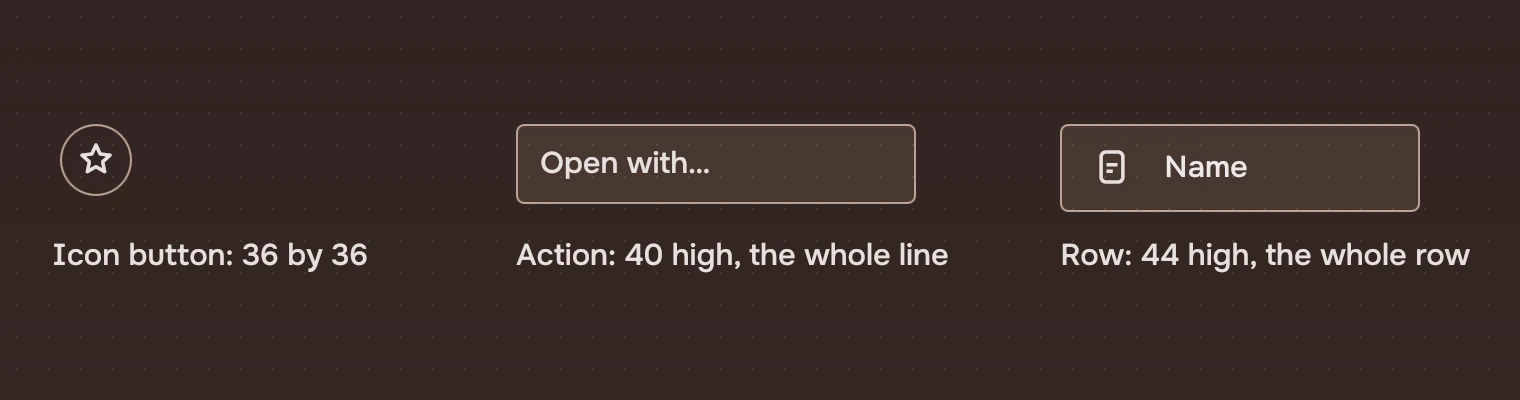
The target is larger than the drawing. No target is smaller than 24 pixels each way (WCAG 2.2, 2.5.8). The kit's are 28 (a jump index mark, the filter's clear), 32 (a rail row, a tab), 36 (an icon button, a field), 40 (an action) and 44 (a row). An icon button's symbol is 17 to 22 pixels in a target of 36. An action is the whole line, wider than its words.
Two are smaller. An InlineLink is the words of a sentence, which the standard excepts. A folded jump index has a dot between two marks, and the dot's target is the 12 pixels left between the marks' two 24-pixel ones.
Motion
Every duration is a motion token, and each goes through Kit.ms(). With Kit.reducedMotion on, every motion takes 0 ms and the two endless stretches, the page header's reading line and an endless progress, stand still. An app can set it; the kit also reads TACIT_REDUCED_MOTION=1 from the environment. It does not yet read a setting of the user's: that is the gap.
Checking an app
tools/lint.py reports raw colours, literal sizes and corners, faded text and symbols Tacit does not draw. It does not check names or keyboard paths. Tab through your app once with the pointer out of reach.
Experimental, in Tacit.Kit 0.1. This page does not yet cover high contrast, text scaling or right-to-left layouts. Turning transparency off makes the window ground solid (see Materials).
Text and figures: CC BY 4.0. Tacit.Kit: LGPL-3.0 code, OFL fonts. The Tacit name.