Music
A music player made only of Tacit.Kit parts, MIT licensed: not one of Tacit's apps but a starting point to read and build on when you make your own. This page shows each of its pages, which part draws what, and how to run it.
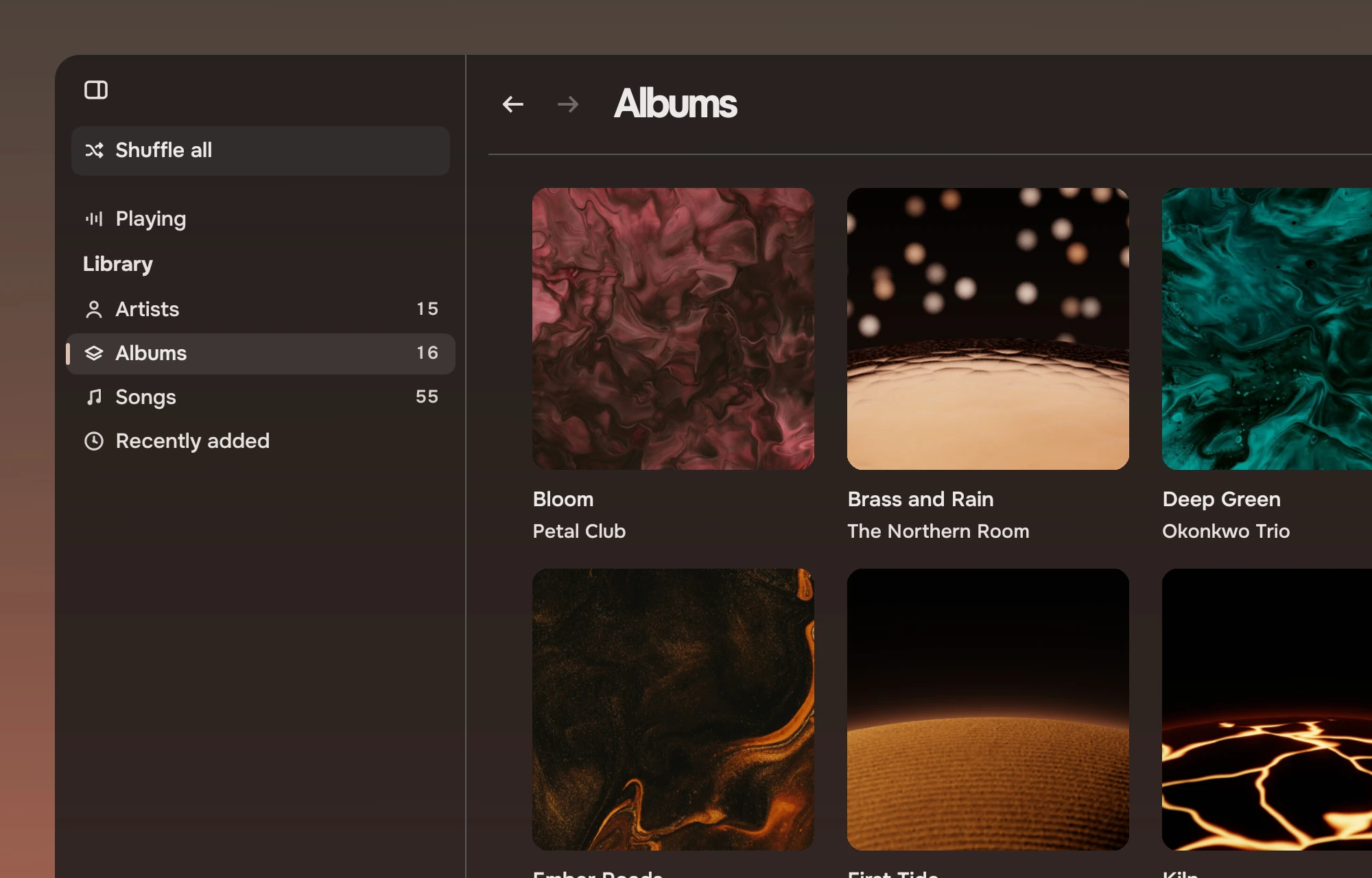
Music plays the files in your Music folder. Everything you see in it is a kit part, except the album covers, which the app draws itself. The app adds state (the library, the player, where you are) and the arrangement of the parts on each page. Its source is the repository tacit-music-example; the images here are renders of that app, made headless on both palettes.
Nothing in it opens, scrolls or rearranges itself because of playback. The accent mark shows where the playing music is, and the lists stay where you left them.
The parts
An album's page, each piece named by a numbered callout.
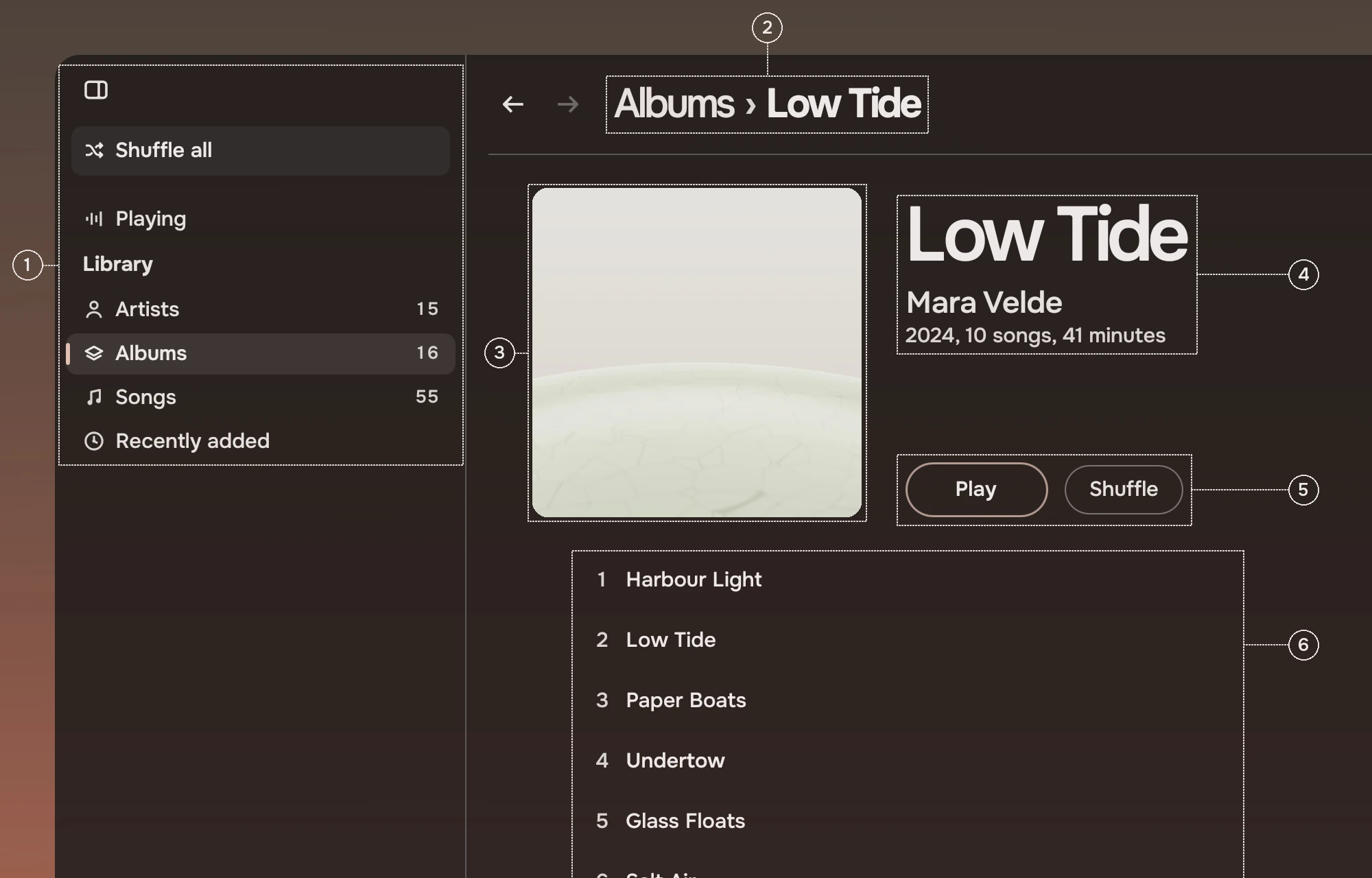
- RailThe rail with Shuffle all as its one action, Playing, and a Library section with a count on each place. It folds to symbols at half width.
- Page headerThe page header: back and forward, and the path as the title, such as Albums, Low Tide. The search field sits in its right end.
- CoverThe album's cover at the head of the page. The app draws it with its own
Cover, which falls back to a symbol when a file has no picture. - Title blockThe album as the page's subject at display size, with the artist beside it as an
InlineLink(the kit's link inside a line of text), then the year and length. - ButtonsTwo slabs, Play and Shuffle, the first forward and the second quiet.
- Song rowsA list row for each song inside a row list: the track number as the row's lead, the name, and the length as a fact at the end. The playing song carries the accent mark and a small waveform. Track numbers are set with
leadFigures, which holds room for two figures in a ten-track album so the numbers line up.
The rest of the parts are in the pages below.
| Where | Parts |
|---|---|
| The window | Rail, RailRow, RailSection, and the kit's tokens for the window's ground |
| Library pages | PageHeader, SearchField, PageState |
| Albums, Recently added | CoverGrid, with scrolling through Glide |
| Songs, an album, an artist | RowList, ListRow, Slab, Waveform |
| Artists | RowList, ListRow, JumpIndex |
| Playing | Transport, Waveform, Slider, SectionHeading, Slab |
| The player bar | Transport, Waveform, Slider, IconButton, Slab |
Text is always TacitText and symbols are always Symbol; sizes, spaces and corners come from Kit.tokens, and the colours follow the wallpaper without the app setting them.
Albums and Recently added
Albums and Recently added are one grid of covers, with the album's name in the main ink and the artist in the secondary ink under each. The grid is the kit's cover grid, a part of its own: it sets one square shape in columns with words under each, where the picture grid sets pictures of any shape in rows with none. The cover that belongs to the playing album carries the accent mark before its name. Recently added puts the newest files first.
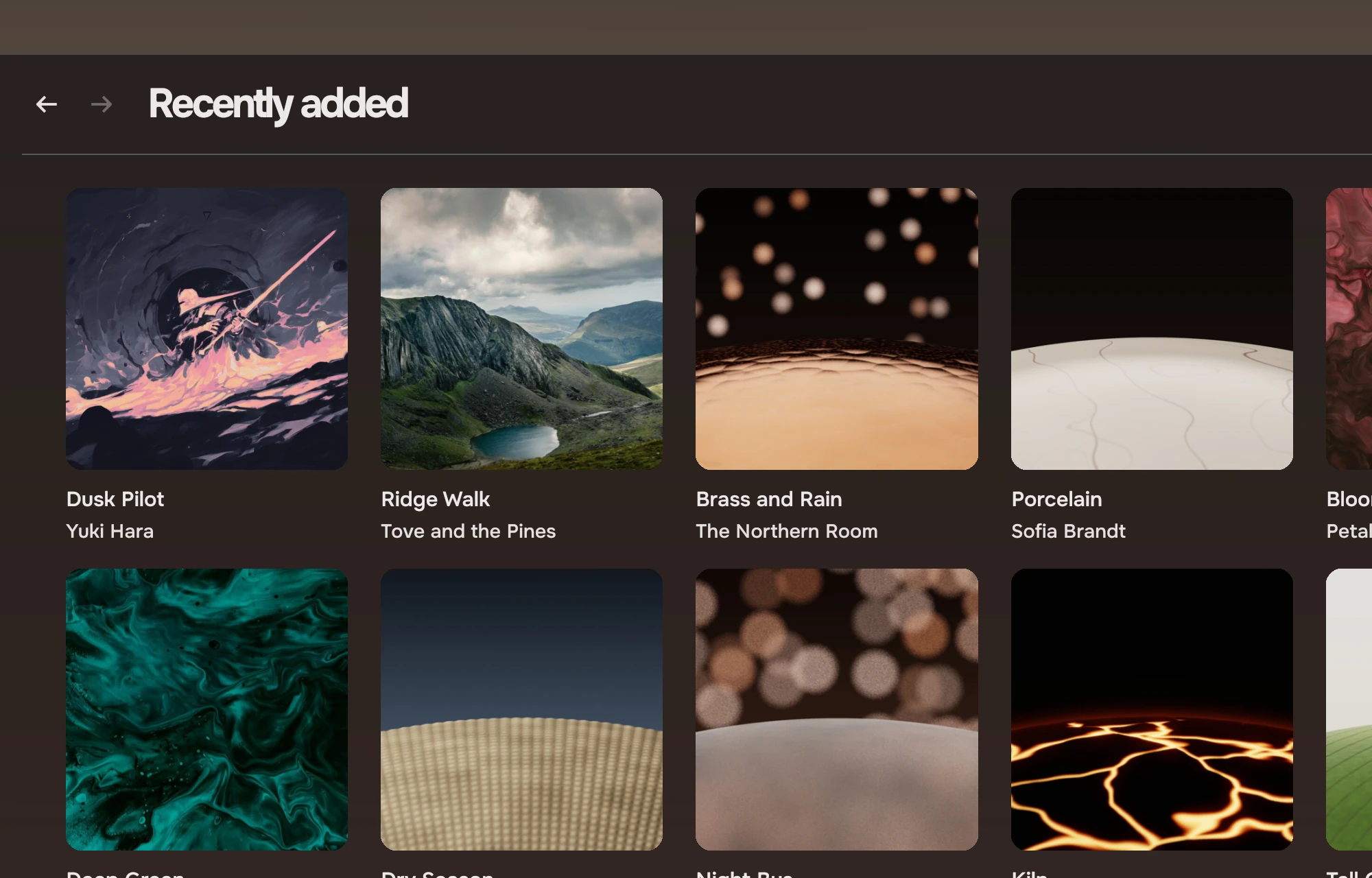
An album opens as its own page, with the path in the header (Albums, Low Tide) and the way back one step away.
Artists
Artists is a list with a small cover, the name, and how many albums, with a jump index down the right edge. The artist who has the playing music carries the accent mark; the list does not move to show it.
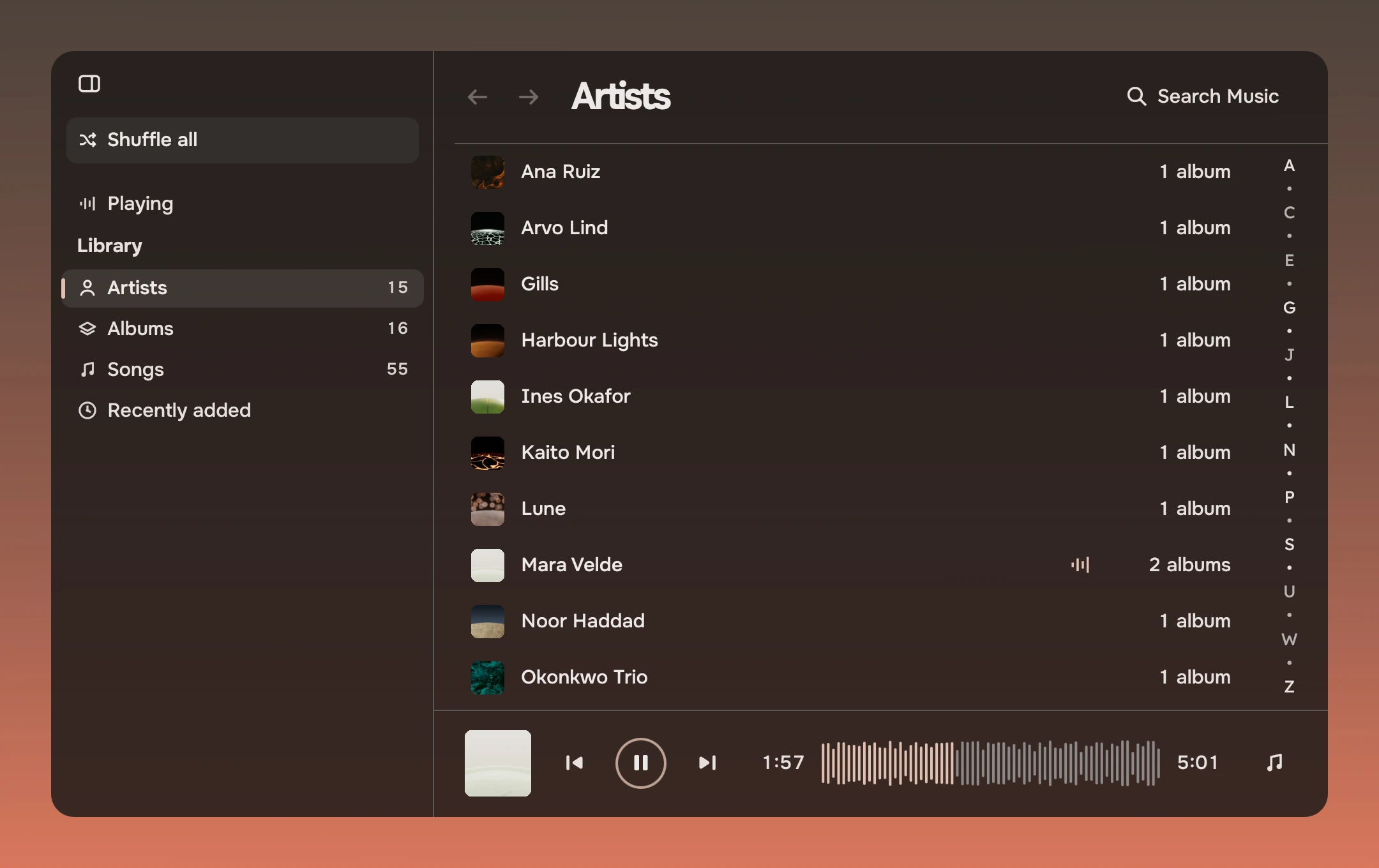
An artist
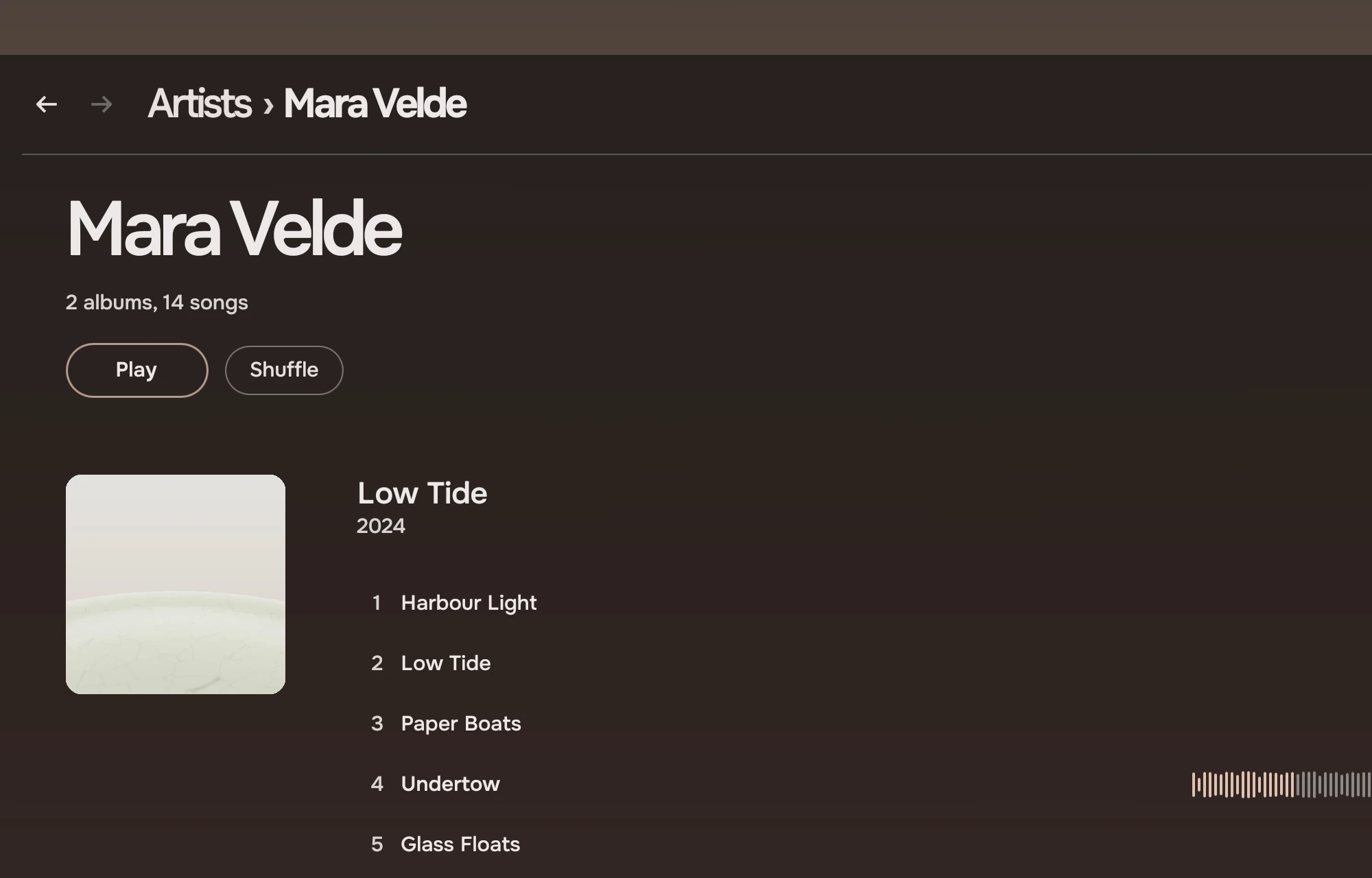
An artist's page opens with the name at display size, the counts, and Play and Shuffle. Below it every album is a section with its own header (the cover, the name, the year), so a whole discography is one list and the arrow keys pass from one album to the next.
Songs
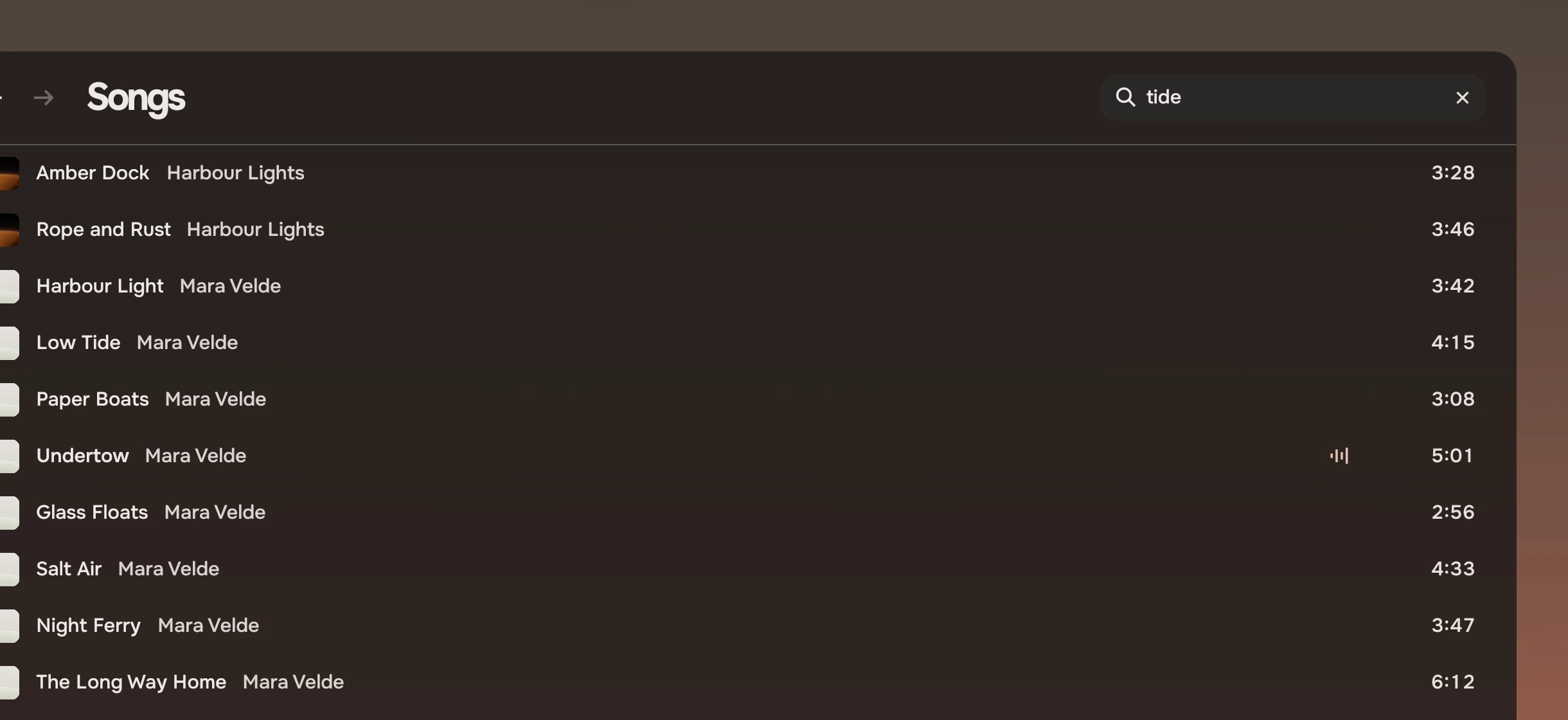
Songs is every song in one list, by artist and album, each row with its cover, the name, the artist beside it and the length. Enter plays from that song on, so the queue is the rest of the list.
Search
The search field opens with Ctrl+F, or from the header. Typing searches the whole library at once, and the results replace the page's content as rows until the field is empty again. From the player or the Playing page, Ctrl+F first goes to Songs, then opens the field.
Playing
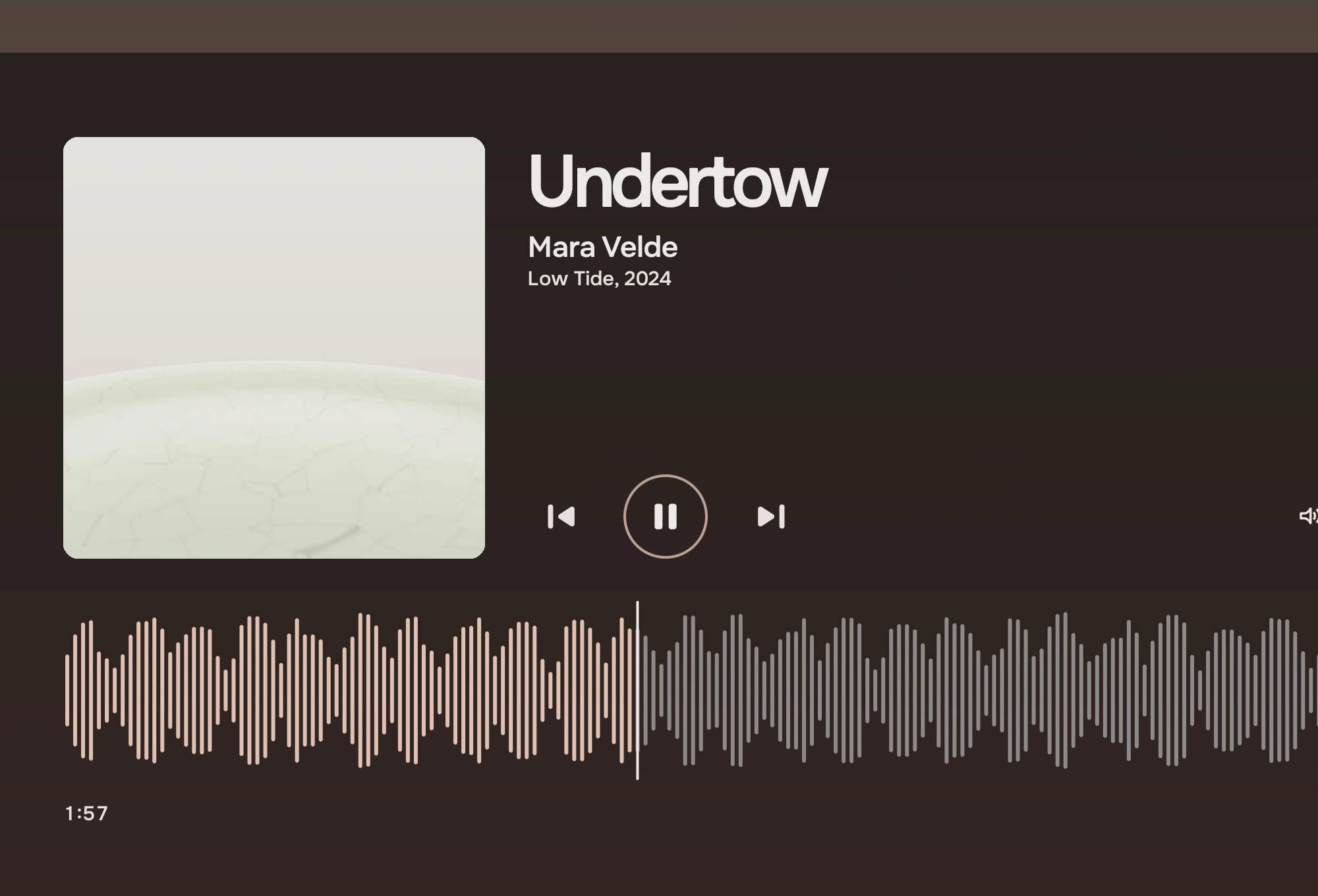
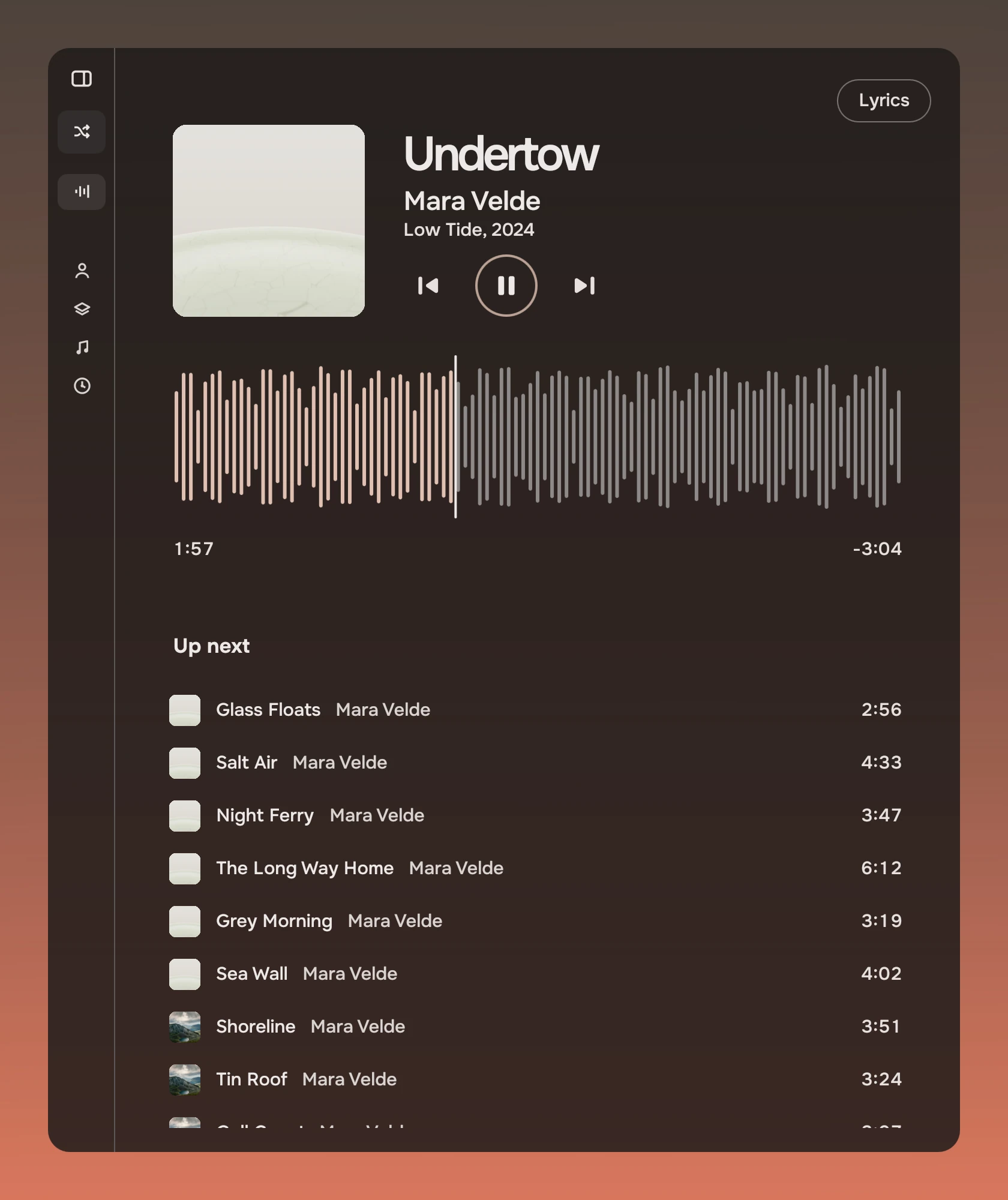
Playing is a stage page. The cover, the song at display size with the artist and album, the transport at 64 and a slider for the volume, and across the page the waveform with the playhead and the time on both sides. Under it, Up next and Played before are rows with covers, each under a section heading. Lyrics, from an .lrc file next to the song, is a page of its own with a way back.
The player bar
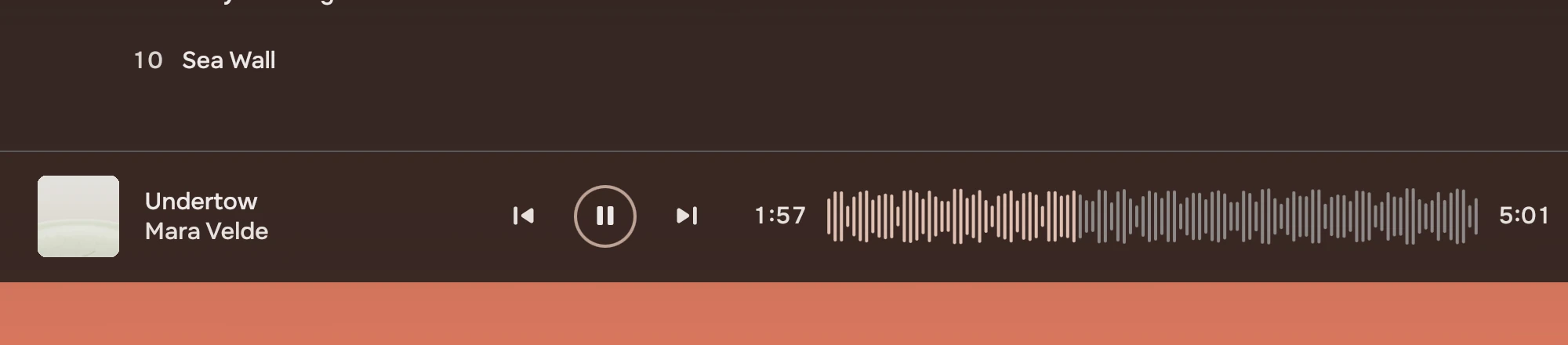
At the foot of the library pages: the cover and the song, the transport at 40, the waveform with the time on both sides, a Lyrics button and the volume. As the window narrows the bar keeps the waveform's room: the volume goes first, then the song's name, since the cover still shows what plays.
At half width the rail folds to its symbols and the Playing page stacks: the transport moves under the title and the queue takes the full width.
Keys
| Key | Does |
|---|---|
| Space | Plays and pauses. In a list Space belongs to the list, which uses it to ask for a look (peeked); Music does not use that, so Enter plays the row under the cursor. |
| Left and Right | Seek five seconds. In the cover grid they step to the previous and next cover. |
| Ctrl+F | Opens Search Music. |
| Arrow keys | Move in lists; in the cover grid Up and Down go a row, and Home and End go to the first and last cover. |
| Letters | Typing in a list jumps to a name. |
| Enter | Opens the cover under the cursor, or plays the row. |
The window takes Space and the seek keys only when no list or button wanted them, so they never fight a control that has focus.
States
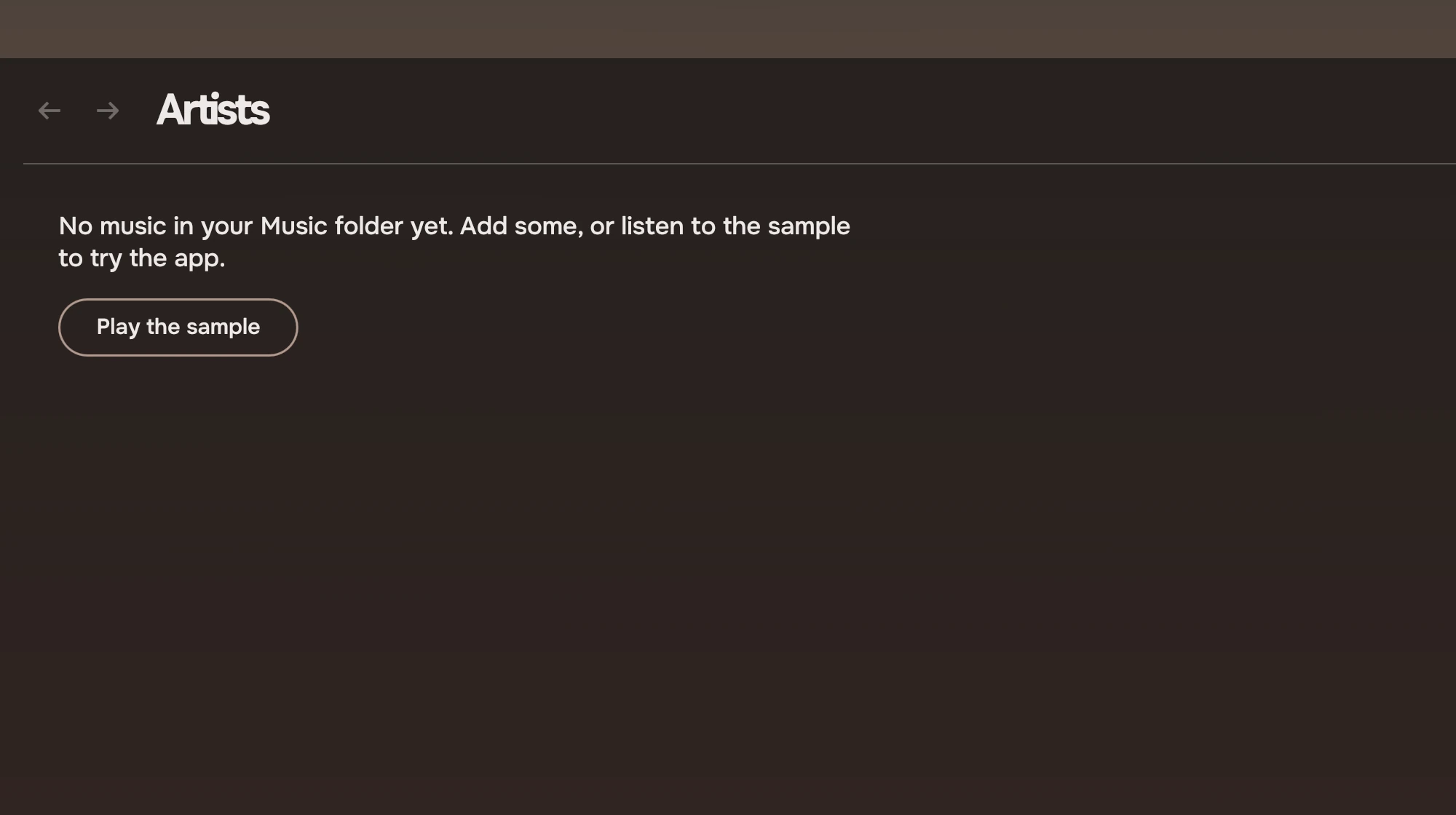
An empty library says so once and offers the way to try the app. A page state holds the sentence and one button, Play the sample, which plays the short tone sequence that ships with the app.
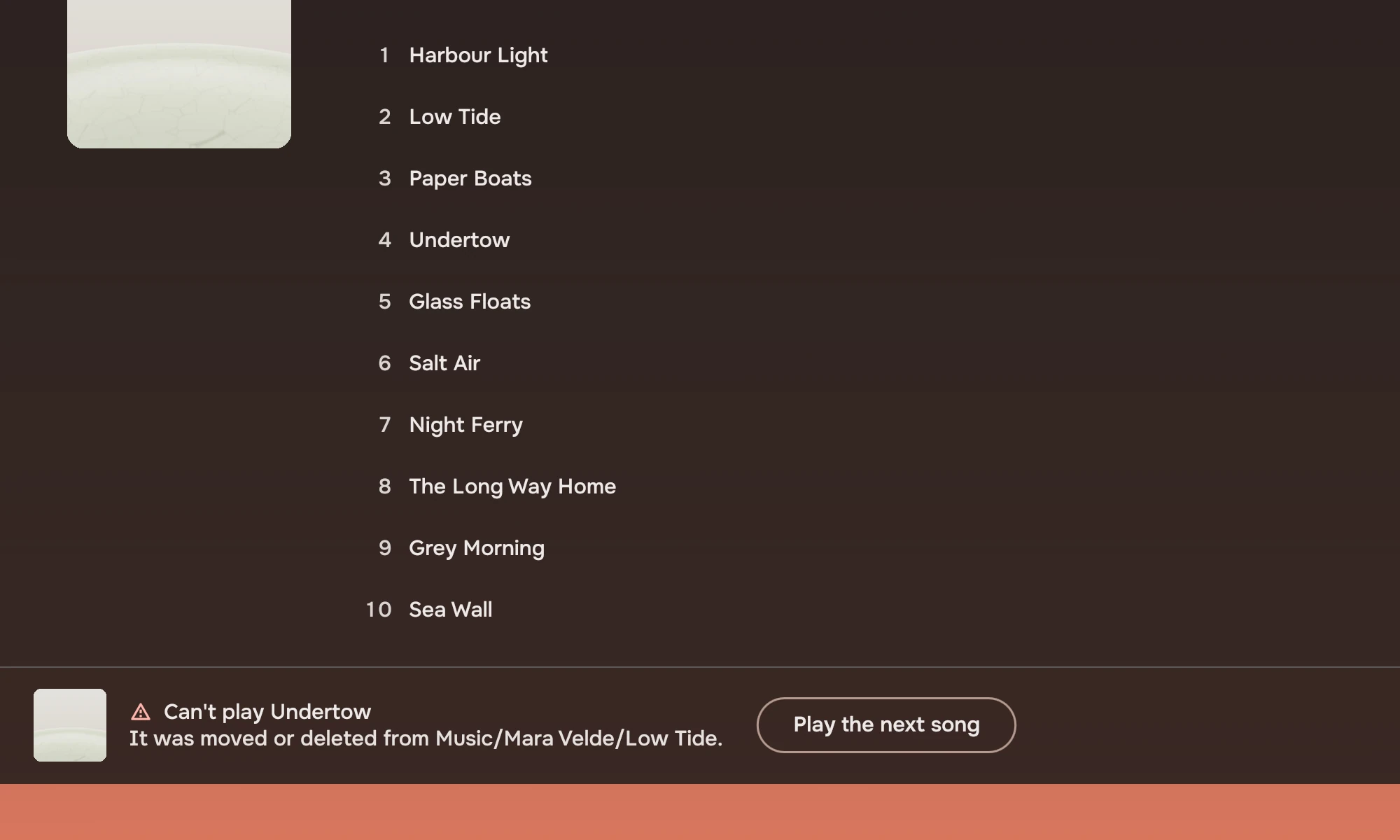
A song that cannot be played, such as a file that was moved or deleted, is marked where it is and said once in the player bar. The row carries a warning symbol in place of its number. The bar names the song, says why, and offers the next one.
Run it
You need Quickshell 0.3 or later, Qt 6.7 or later with QtMultimedia, ffmpeg and ffprobe, and Tacit.Kit on the QML import path. On Tacit the kit is installed. Elsewhere, point the import path at the kit:
QML_IMPORT_PATH=/path/to/tacit-kit/qml qs -p shell.qml
| Variable | Does |
|---|---|
MUSIC_DIR | The folder to read. The default is ~/Music. |
MUSIC_MUTED=1 | Mutes the audio output, for tests. |
XDG_CACHE_HOME | Where the cache goes. tacit-music-example/ holds covers and waveform peaks. |
To try it without your music, tools/make-demo.sh makes 55 short tones with tags and covers, and MUSIC_DIR points the app at them. tools/render.sh renders every page offscreen on both palettes; it starts the app with MUSIC_SCENE set, a test hook that nothing else depends on.
How the app is built
State is three singletons. Library reads the folder with find and ffprobe and takes each cover from folder.jpg, cover.jpg or the first song's own picture. Player owns the queue, the history, the volume and one MediaPlayer. Nav is a stack of pages with a place in it. Each page is one file, and the four library pages sit in LibraryPage, which gives them the header, the search, the player bar and the empty state. Every list is a RowList whose rows are one small wrapper around ListRow, wired to its list for selection, the keyboard ring and Enter.
Pages never write to the queue or the lists because of playback; they read current, upNext and history.
What the kit did not cover
- Music has no shuffle or repeat toggles.
IconButtonnow has a toggled state (checked), which the app has not used: shuffle is the rail's action and the Shuffle slab. PageStatewraps its text at 560 pixels by default, so the empty-state sentence takes two lines;maxWidthmoves the wrap.- There is no order menu on library pages.
MenuButtonexists; the app leaves sorting out.
Code
The Albums page is the cover grid and what opening a cover does.
LibraryPage {
    here: "Albums"

    CoverGrid {
        x: Kit.tokens.space.page
        y: Kit.tokens.space.xl
        width: parent.width - 2 * Kit.tokens.space.page
        height: parent.height - y
        readonly property var albums: Library.albums
        items: albums.map(a => ({ source: a.cover, title: a.name, subtitle: a.artist, current: a.key === Player.current?.albumKey }))
        glyph: "music_note"
        onActivated: i => Nav.go("album", albums[i].key, albums[i].name)
    }
}
Experimental, in Tacit.Kit 0.1.
Text and figures: CC BY 4.0. Tacit.Kit: LGPL-3.0 code, OFL fonts. The Tacit name.