Rail
The places of an app down its left edge: 300 pixels wide, or folded to 56 with only their symbols. It is where you are and where you can go.
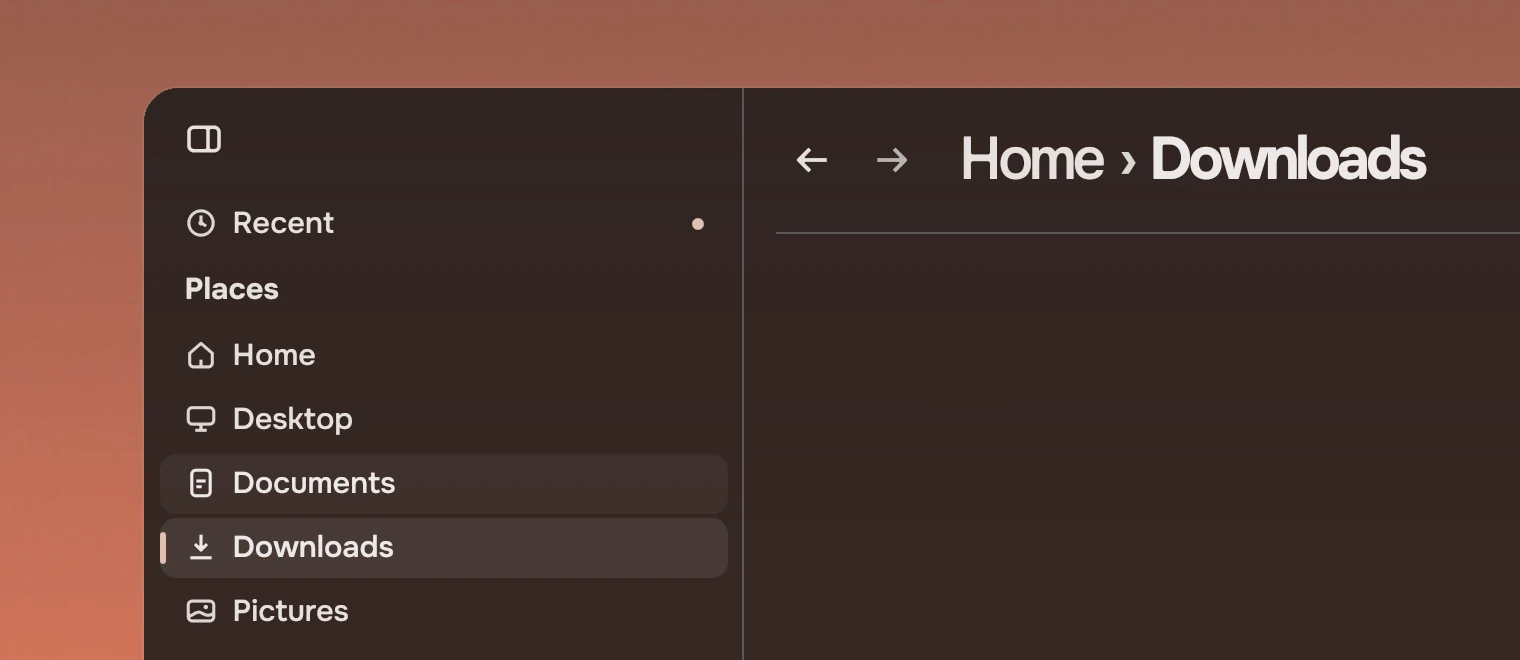
Use it for the few places an app is made of: Files' folders and drives, Music's library. It holds places only. Actions on a thing in the page go in a docked panel or a menu, and a setting is not a place. The rail has three parts: the rail itself (Rail), the sections that label its groups (RailSection) and its places (RailRow).
Anatomy
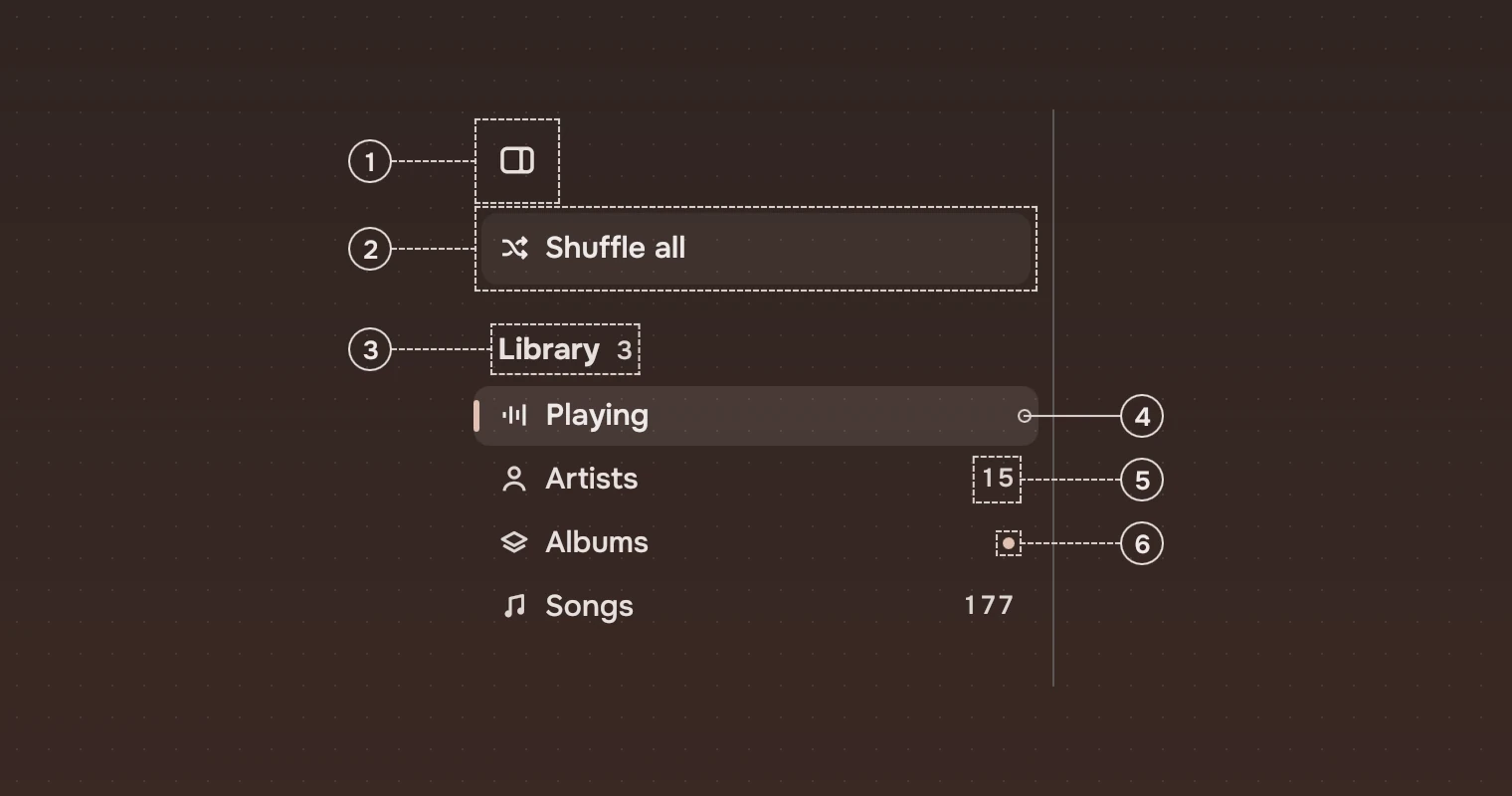
- ToggleFolds the rail to its symbols and back. It is the only thing that folds it.
- ActionOne action at the top at most, with a symbol and its words (Music's Shuffle all), on a 6 % wash of the main ink. Folded, it keeps its place as its symbol.
- SectionA label over a group of places, strong, in the secondary ink, with a count beside it in the meta ink when that helps.
- Current placeWhere you are: a 10 % wash inset 8 pixels from each side, an accent tick at its edge, the name in medium weight and the main ink. Only one place is current.
- What it holdsAt the end of a row, in the meta ink: a count, or how full a drive is.
- NewAn accent dot at the end of the row instead of the count: something arrived since you last looked.
A hairline on the right edge divides the rail from the page.
States
A place changes only by wash, the tick and the weight of its name. Like a list row, it never changes its shape or its words.
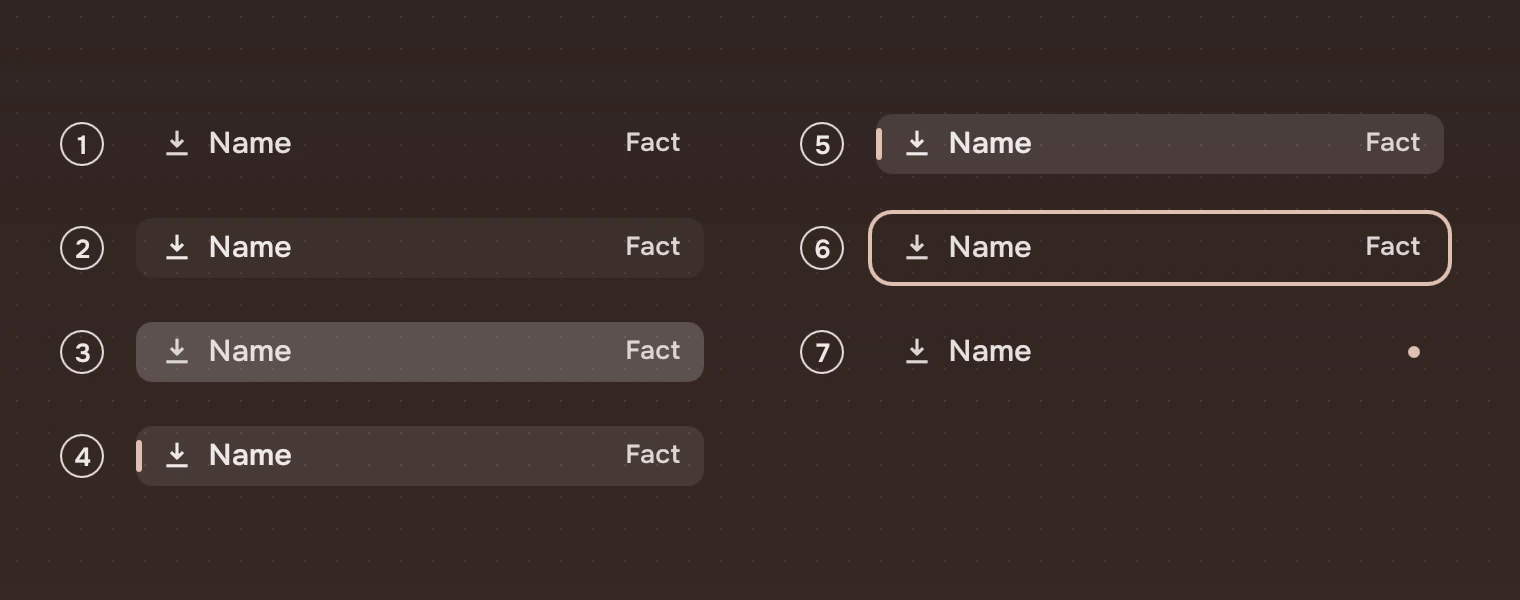
- RestNo wash, the symbol in the meta ink and the name in the secondary ink.
- Pointer over itThe wash, and the symbol and name go to the main ink.
- PressedThe pressed wash.
- CurrentThe selected wash, the accent tick, the name in medium weight.
- Current, pointer over itThe selected wash a step stronger.
- Keyboard focusThe ring, around the wash.
- NewA 6-pixel accent dot at the end, in place of what the row holds.
The washes and the ring are the ones on States. A place that is not available now, such as a drive that is not there, is set enabled: false: its symbol, name and count in the faint ink, no wash, no press, and the rail's arrows and Tab skip it.
Folded
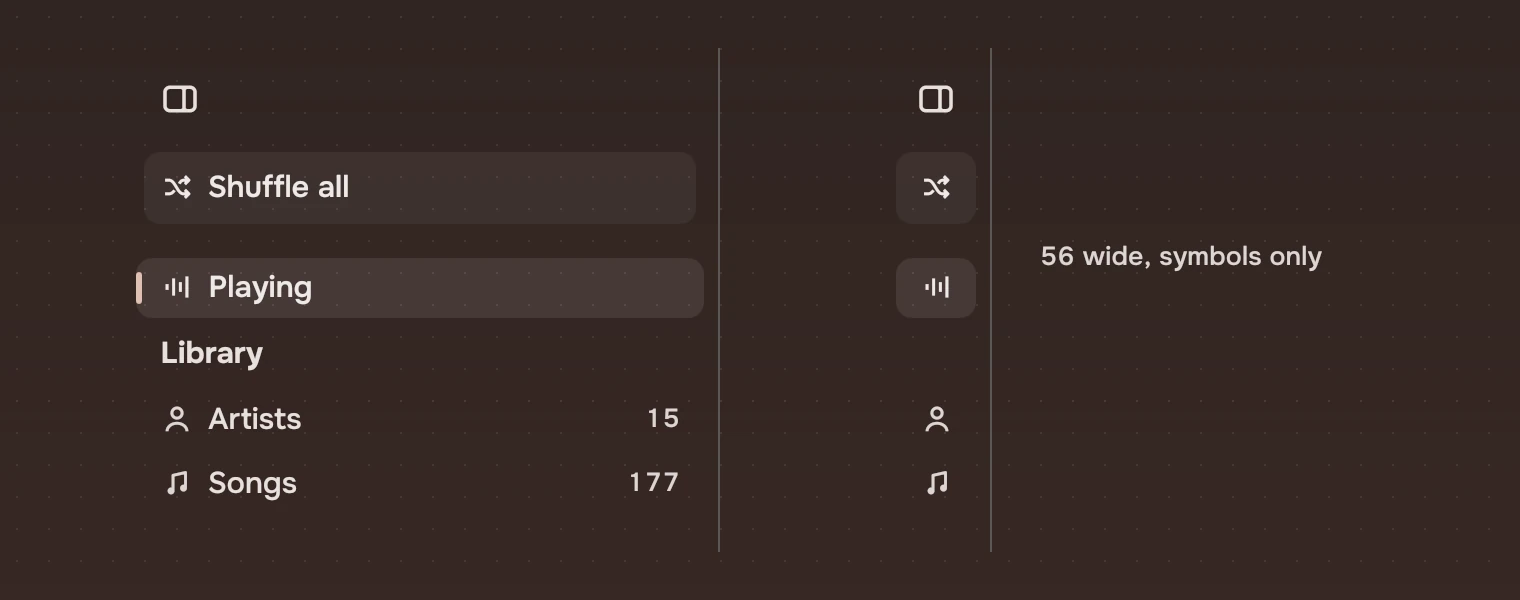
Folded, the names, counts and section labels fade out over 150 ms, but a section keeps its room, so the groups stay apart. The rail takes 200 ms to fold and 300 ms to unfold. A folded place names itself in a tooltip while the pointer rests on it or the keyboard is on it. The rail never opens under a passing pointer: only the toggle folds it and unfolds it.
Sizes
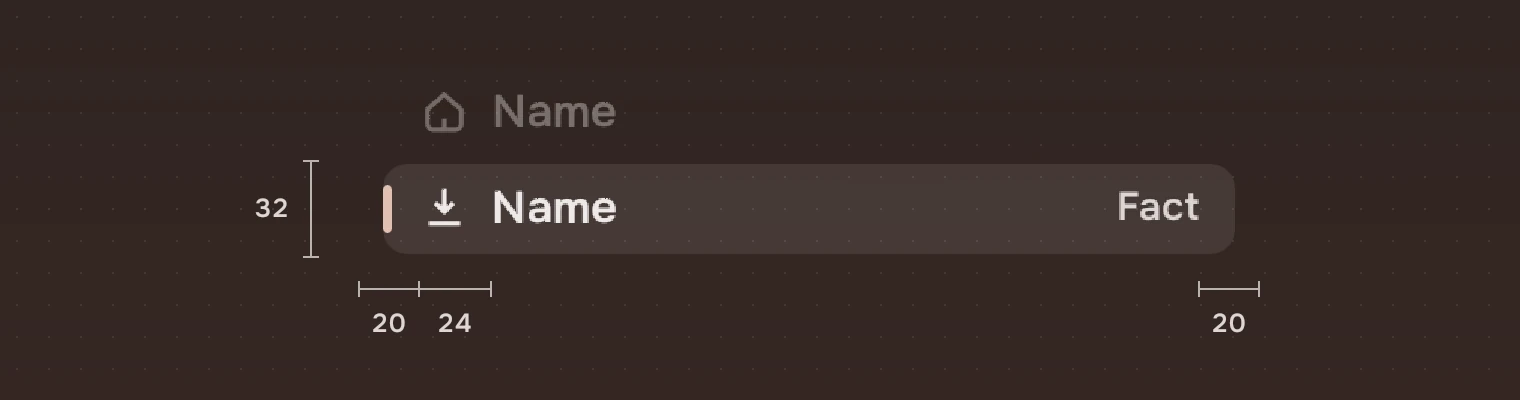
| Part | Value |
|---|---|
| Rail width | 300, folded #56 |
| Place height | 32 |
| Section height | 34 |
| Toggle | 36 pixels square, 12 from the left (centred when folded), 8 from the top |
| Action | 36 high, 12 in from each side, 52 from the top; places start 16 below it (52 from the top without one) |
| Symbol | 17 pixels, starting 20 from the left |
| Name | Starts at 44, 15 pixels |
| What it holds | Ends 20 from the right, 13 pixels, in the meta ink |
| Wash | Inset 8 from each side and 1 from the top and bottom, corner 8 |
| Accent tick | 3 by 16, 8 from the left of the wash |
| Focus ring | Around the wash, as on States |
Keys and pointer
The rail is one stop for Tab. It lands on the current place, or on the first if none is current.
| Do this | To |
|---|---|
| ↑ ↓ | Move to the place above or below |
| Home End | Go to the first or the last place |
| Enter or Space | Go to the place (on the action, do it) |
| Menu | The place's menu |
| Click | Go to the place |
| Right-click | The place's menu |
Accessibility
- The rail has the role of a pane named "Places". Each place is a list item, named by its name and what it holds ("TRANSFER, 41 GB free"), and says whether it is current. Each section is a heading.
- The toggle, an icon button, is named "Fold the places" or "Show the places". The action is a button named by its words.
- Where you are is shown by the wash and the tick, not by colour of the words alone, and the new dot is a shape. A screen reader also hears "New", "Needs attention" and "Drop here".
- The rail's inks, counts included, reach an APCA contrast of 75 on both palettes, on the plain ground and under the pointer on the current place. A place that is not available is in the faint ink and does not.
Writing
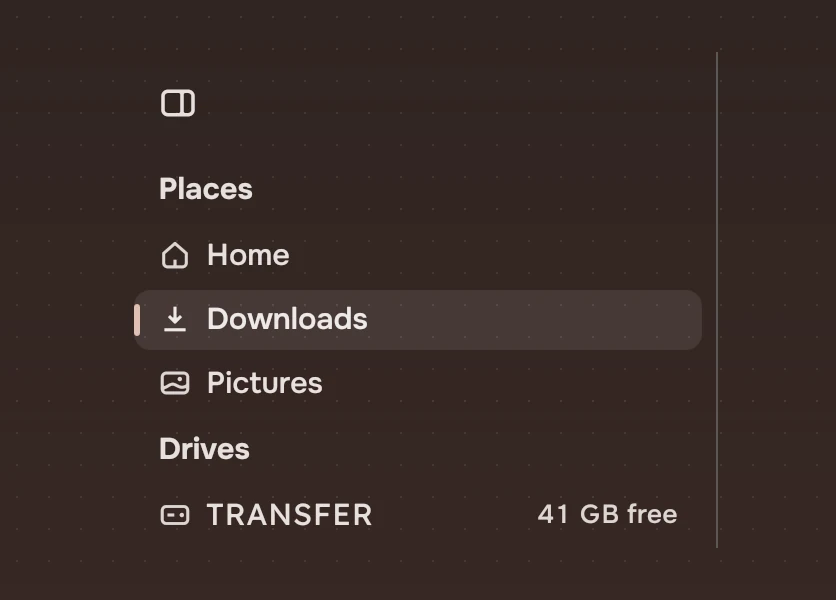
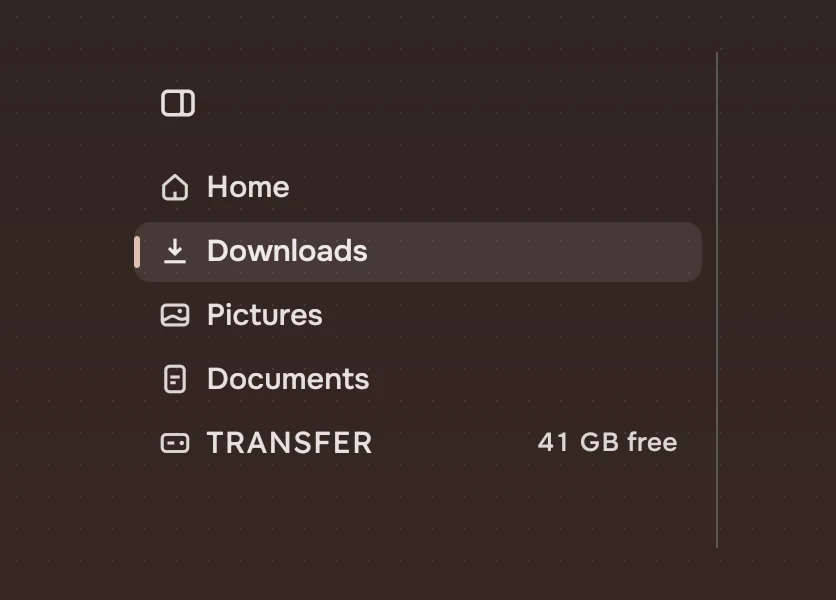
Name a place by what it is, in one word where you can: "Home", "Downloads", "Artists". Put what it holds at the end and nothing else after it: "41 GB free", "177". A section label names the group, not the action: "Places", "Drives".
Do and don't
Code
import Tacit.Kit

Rail {
    id: rail
    height: parent.height
    onToggle: folded = !folded
    RailRow {
        glyph: "schedule"; label: "Recent"
        fresh: recent.unseen; onPicked: go("recent")
    }
    RailSection { text: "Places" }
    RailRow {
        glyph: "home"; label: "Home"
        current: here === "home"; onPicked: go("home")
    }
    RailRow {
        glyph: "download"; label: "Downloads"
        current: here === "downloads"; onPicked: go("downloads")
    }
    RailSection { text: "Drives" }
    RailRow {
        glyph: "usb"; label: "TRANSFER"; context: "41 GB free"
        onPicked: go("transfer")
    }
}
| Property or signal | What it does |
|---|---|
Rail.folded | Folded to 56 pixels, symbols only |
Rail.action, actionSymbol | The one action at the top: its words and its symbol |
Rail.foot | Rows kept at the rail's bottom, 16 from the edge (Trash in Files); the places scroll above them |
Rail.toggle(), actionActivated() | The toggle was pressed; the action was activated |
RailRow.glyph, label | The place's symbol and its name |
RailRow.context | What it holds, at the end |
RailRow.current, fresh | Where you are; something new (a dot in place of context) |
RailRow.attention, dropTarget | The symbol in the accent: something there needs you; a ring in the accent while something that can be dropped is over the row |
RailRow.accessory | Items at the row's end, such as an eject button; while one shows it replaces context and the dot |
RailRow.enabled | false for a place that is not available now |
RailRow.picked(modifiers), contextRequested(at) | Go to the place; ask for its menu |
RailSection.text, count | The group's label, and a count beside it |
A rail and its rows find each other: put the rows and sections inside the rail, at any depth. They scroll when there are more than fit, and the arrow keys scroll to the row they land on.
Experimental, in Tacit.Kit 0.1. Changed 25 October 2026: first version.
Text and figures: CC BY 4.0. Tacit.Kit: LGPL-3.0 code, OFL fonts. The Tacit name.