Menu
A short list of words over the page: a sort order, the actions on a file, a few choices to tick. It opens from a button or a right-click and closes when something is picked.
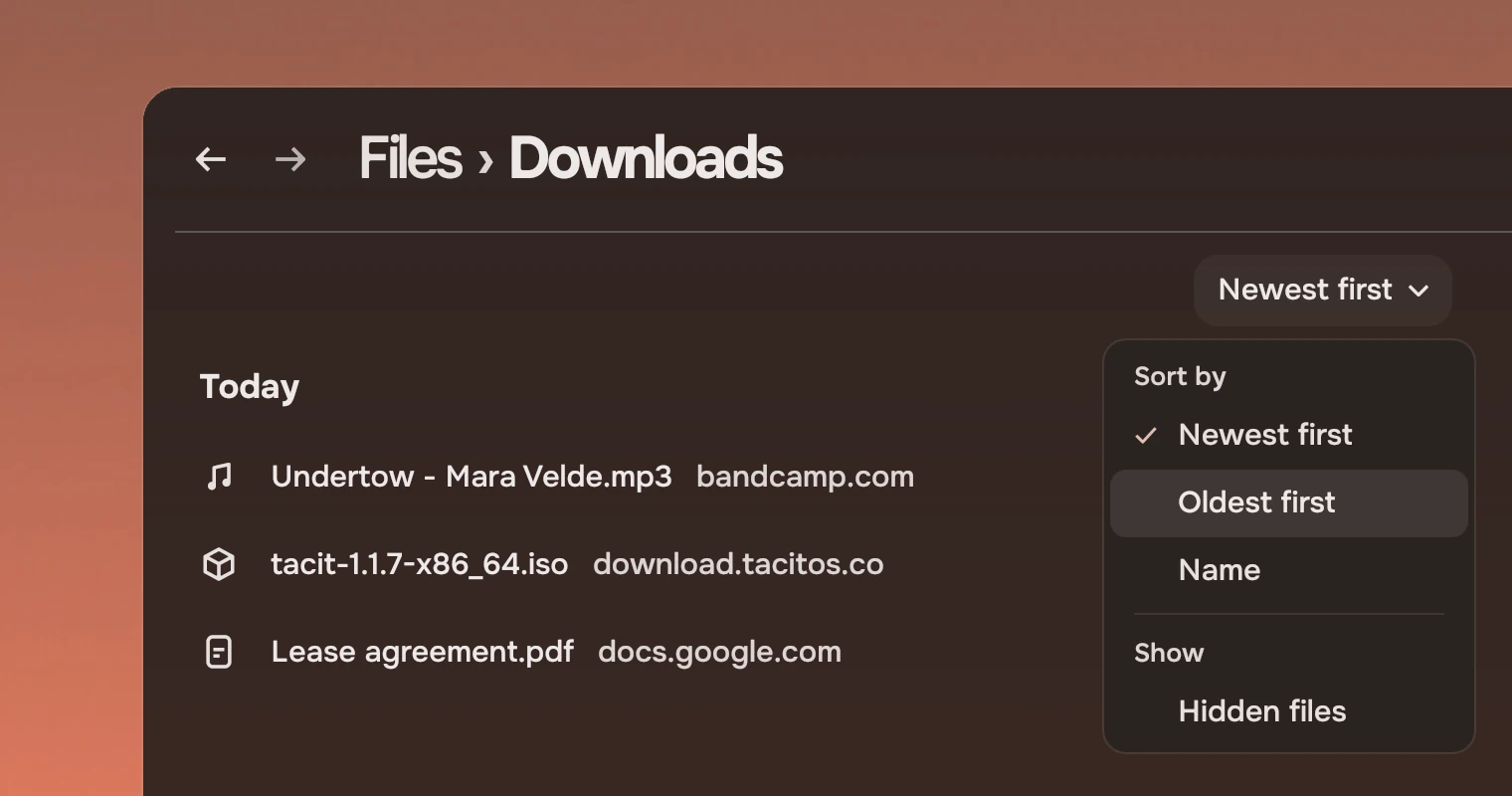
Use a menu for choices that change what you see, and for a thing's lesser actions when there is no room for a docked panel. Three parts make it:
MenuButtonis words with a chevron that open a menu under it, aligned to its right edge.Menuis the popup itself, for a menu you open at a point, such as a right-click.MenuSurfaceis the menu as it looks, drawn in place.Menushows it in a popup.
Anatomy
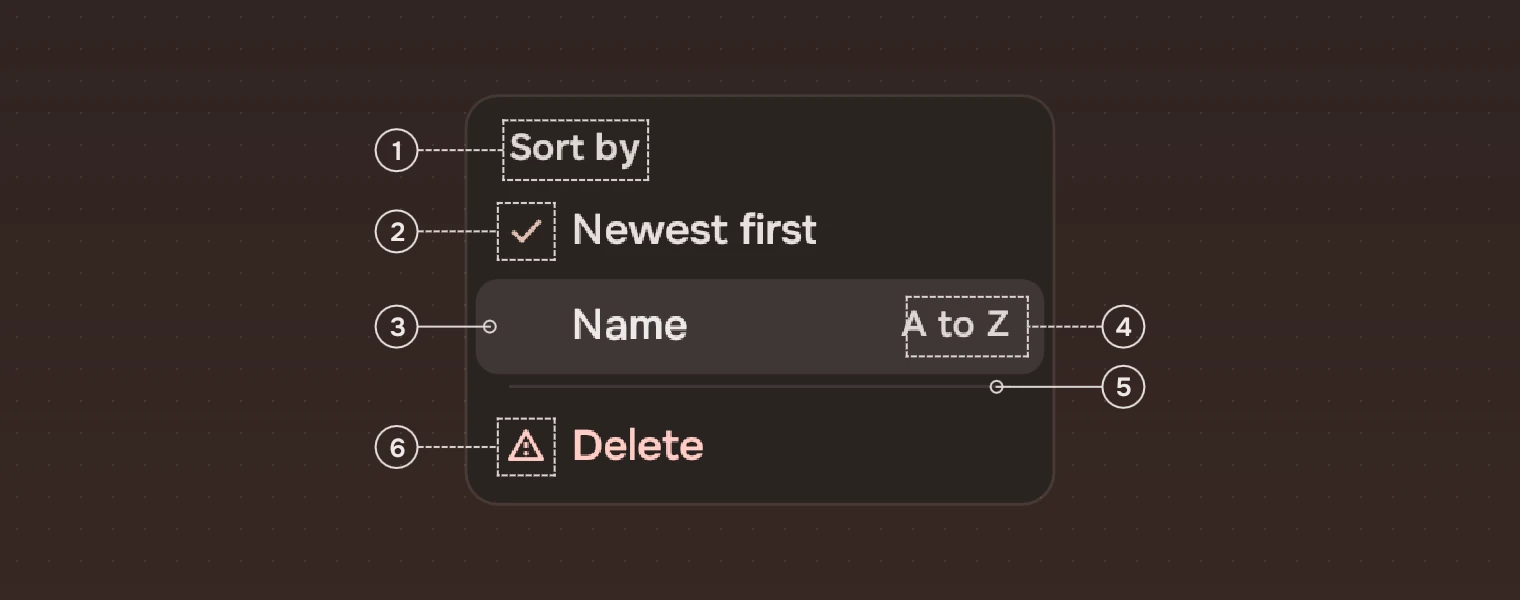
- Group nameIn the meta ink for the overlay, medium weight, 13 pixels. It is not pressable and the keyboard skips it.
- TickA check in the accent, 16 pixels, on the choice in force.
- LineWords, 34 high, in the secondary ink. The line under the pointer or the keyboard has a wash of 10 % and its words in the main ink.
- DetailA word or number at the end of the line, 13 pixels in the meta ink for the overlay: a key, a count.
- RuleA hairline between groups, 9 high with the line 1 pixel at 10 % of the main ink.
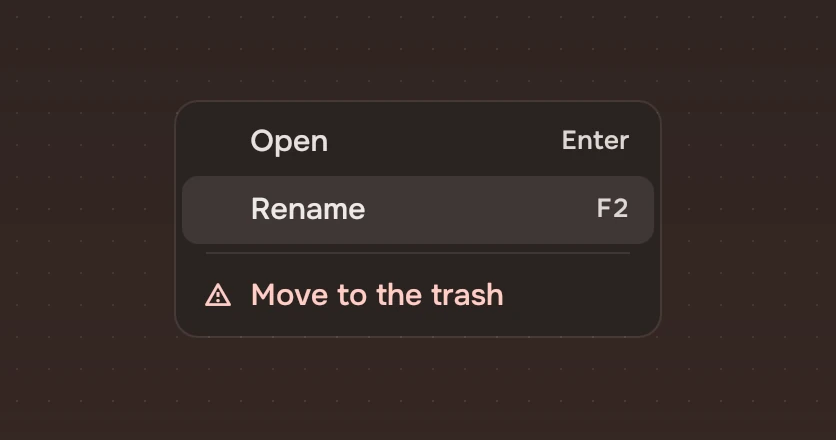
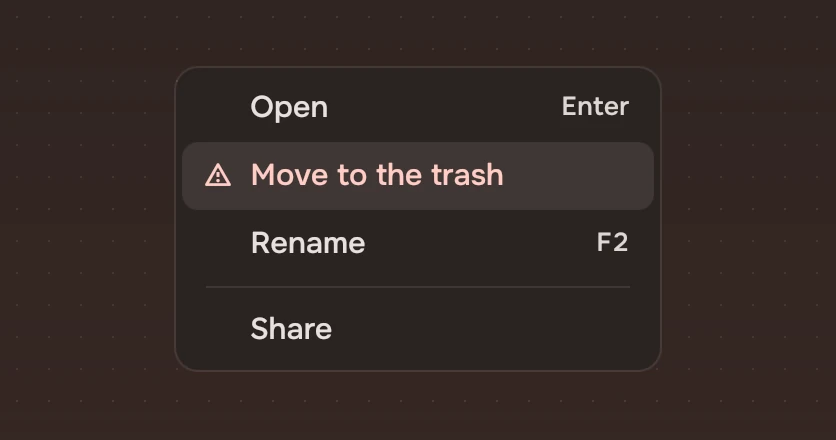
- RiskThe warning symbol and the risk ink for the overlay. It goes last.
The menu is solid, in the overlay colour, with a faint 1-pixel edge. Text under it never shows through. The overlay's inks (group names, details, the risk line) are solved to an APCA contrast of 75 on a lit line, so they read on every line.
States
A line has two states, and the keyboard adds the ring. The menu itself fades in and grows from 0.96 over 150 ms (fadeFast), and fades out over 100 ms (dismiss).
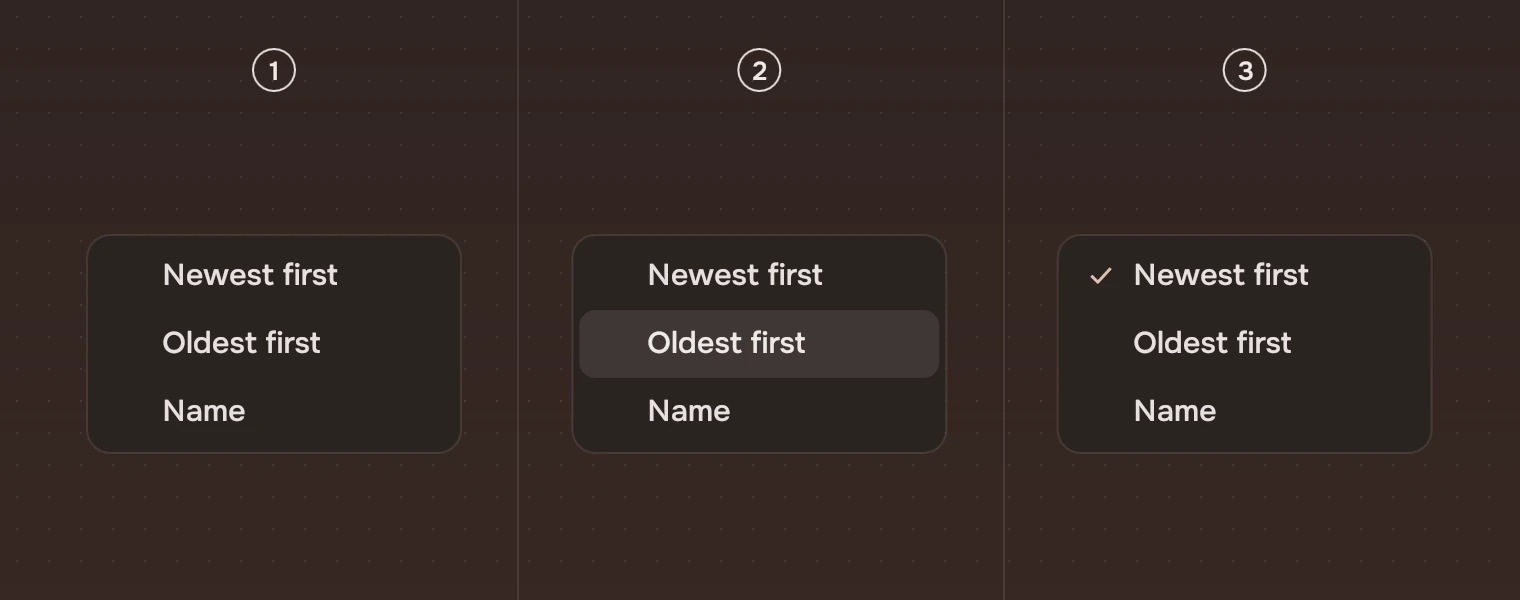
- RestNo wash.
- Under the pointer or the keyboardA wash of 10 %, in and out over 80 ms, and the words in the main ink. The pointer and the keyboard share one line. After a key, that line also has the focus ring, so the keyboard's place does not depend on the wash.
- Choice in forceA tick before the words. It has no wash of its own.
Sizes
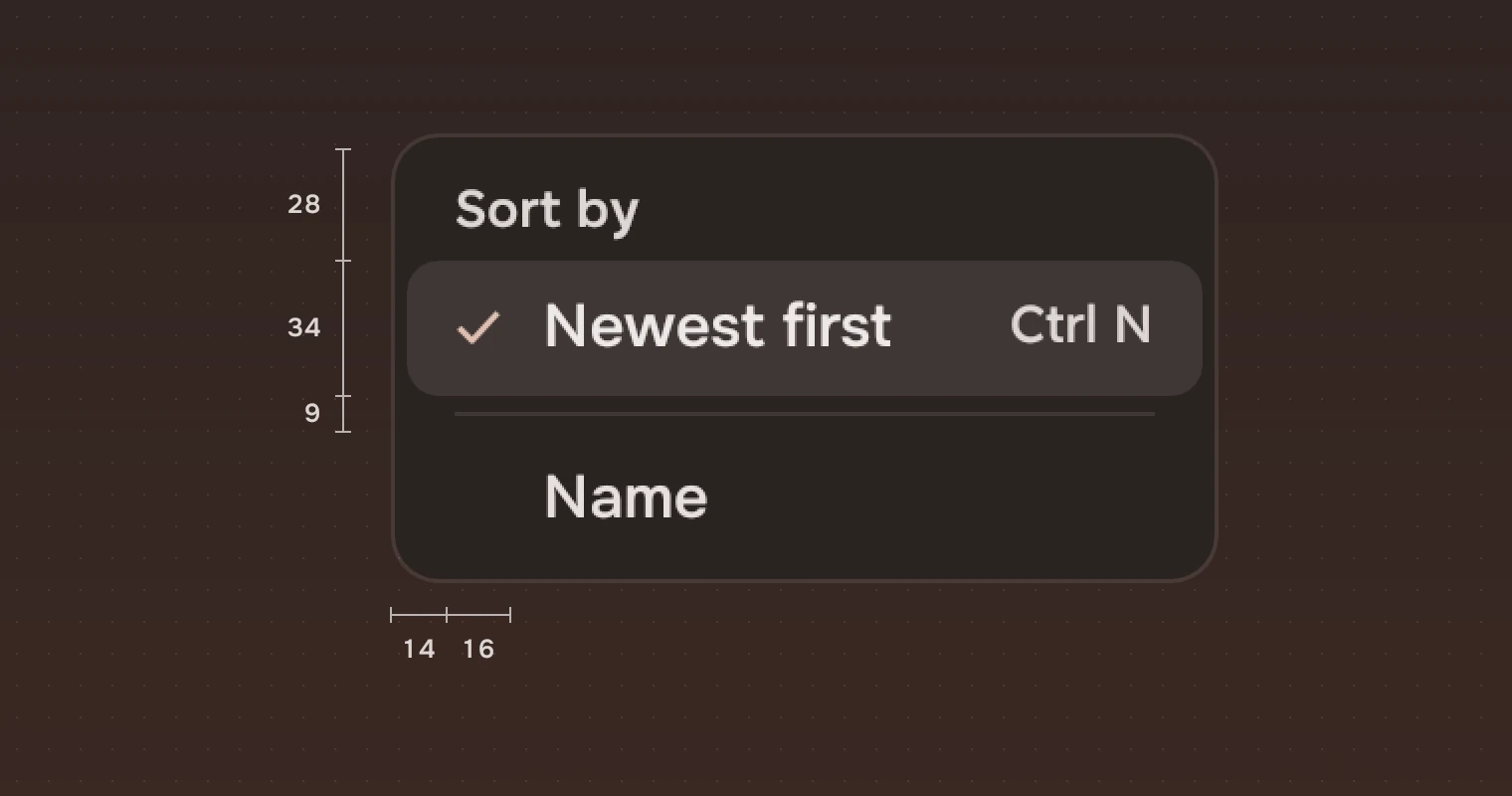
| Part | Value |
|---|---|
| Line | 34 high (height.menuRow) |
| Group name | 28 high, its words at 12 from the line's edge |
| Rule | 9 high |
| Edge | 4 all round |
| Tick or symbol | 16 pixels, 10 from the line's edge |
| Words | 15 pixels, 34 from the line's edge (13 for a group name) |
| Detail | 13 pixels, 12 from the line's right edge |
| Width | The widest label with 12 each side and the tick's room (28), and the widest detail with 24; at least 180, and 8 for the edge |
| Corner | 12 (radius.slab); a line's wash #8 (radius.row) |
A MenuButton has the search field's padding and shape: 36 high, 12 before the words, 4 between the words and the 18-pixel chevron, 8 after.
Keys and pointer
| Do this | To |
|---|---|
| Enter, Space or ↓ on a MenuButton | Open the menu with the cursor on its first item |
| ↑ ↓ | Move to the line above or below, skipping rules and group names |
| Home End | Go to the first or the last line |
| A letter | Go to the next line whose label starts with it |
| Enter or Space | Pick the lit line |
| Esc | Close, and give the focus back to what opened the menu |
| Click | Pick a line |
| Click outside | Close |
A line with keepOpen leaves the menu open when it is picked, so several kinds can be ticked in a filter. If the first item is a group name, no line is lit until ↓.
Accessibility
- The menu is a popup menu; each line is a menu item named by its label, with the detail as its description, and says whether it is ticked. A risk line is read as its label and "warning". A rule is a separator and a group name a heading.
- A
MenuButtonis a menu button named by its words. - The risk is shown by its symbol, its place and its words, not by colour alone, and the tick is a symbol.
- The focus stays inside the menu while it is open and goes back to its button on Esc.
Writing
Keep a line to a word or two: "Newest first", "Rename", "Move to the trash". Name a group with a noun: "Sort by", "Show". Put a key as the detail, as the system writes it: "F2", "Enter". Do not add "..." to a line unless it opens another step that asks you something.
Do and don't
Code
import Tacit.Kit

MenuButton {
    text: "Newest first"
    items: [
        { heading: true, label: "Sort by" },
        { label: "Newest first", checked: true },
        { label: "Oldest first" },
        { rule: true },
        { heading: true, label: "Show" },
        { label: "Hidden files", keepOpen: true }
    ]
    onPicked: i => files.choose(i)
}
| Item key | What it does |
|---|---|
label | The words |
checked | The tick: the choice in force |
risk | The warning symbol and the risk ink. Put it last |
detail | A quiet word or number at the end of the line |
heading | A group's name; not pressable |
rule | A separating line; not pressable |
keepOpen | Leaves the menu open when the line is picked |
| Part | What it does |
|---|---|
MenuButton | text, items; picked(index), the index into items, counting group names and rules. With no items it sends activated() instead, to show more of the page |
Menu | A popup: items, openAt(item, x, y), picked(index), also an index into items |
MenuSurface | The menu in place: items, cursor (the lit line, -1 for none), keyboard (the cursor is the keyboard's, so its line has the ring), picked(index) |
Experimental, in Tacit.Kit 0.1.
Text and figures: CC BY 4.0. Tacit.Kit: LGPL-3.0 code, OFL fonts. The Tacit name.